When you see the size of small astronomical instruments sold in specialty stores, they only impress novices. On the other hand, a telescope of 200 mm in diameter measuring between 1.5 and 2 m in height like the one presented above on the left intimidates already an amateur informed by its proportions and the quality of its images.
So imagine a telescope 1.5 m to 1.8 m opening as some amateurs have built (see the article on Dobson telescopes). It is disproportionate and very impressive. It is even more so when we know that despite a weight greater than 100 kg we can handle it alone. Whoever has the chance to observe the sky with the eyepiece of such a giant remembers all his life so the show is dazzling, in every sense of the term (see these images of Jupiter and M13 taken to through telescopes of different diameters).
Now imagine a telescope housed under a tall dome like a building! As we see below, at the end of the 19th century the optician engineers did not hesitate to make giant astronomical glasses whose objective measured 83 cm in diameter (Observatoire de Paris), 91 cm (Lick Observatory ) and even the record 102 cm in diameter (Yerkes Observatory). Some of them are still used, certainly more to observe or photograph the deep sky but especially to study the suburbs of the Milky Way and nearby objects such as asteroids.
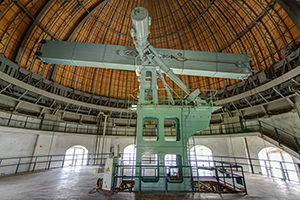
Because of their location often close to major cities and their limited separating power, today these large astronomical glasses of other age are relegated to additional tasks in favor of large telescopes mirror. In California, some 80 km south of Pasadena is one of the most prestigious telescopes in the world, which for a long time remained unrivaled: the 5-meter diameter Hale telescope on Mount Palomar. This very impressive instrument makes it possible to explore the depths of the Universe with such a resolution that it served as a model for the largest telescopes of today: the BTA-6, Magellan and MMT (~ 6 m in diameter), the VLTs, Gemini and Subaru (~ 8 m diameter), Keck (9.8 m diameter) and GTC (10.4 m diameter), and telescopes four times larger in a few years!
But a sign of progress and of necessity, for more than half a century, no astronomer has any more eyes on the eyepiece of these giant telescopes, which in any case are not equipped for this purpose, the large CCD sensor like a suitcase that has replaced the eyepiece for a few decades now. Only telescopes 1 to 2 m in diameter and large astronomical glasses over one meter in diameter are still equipped with an eyepiece and a guide bezel. But their use becomes anecdotal.
3,180 comments
Hi các bác, nếu anh em đang kiếm cổng game không bị chặn để chơi Tài Xỉu thì tham khảo chỗ này. Không lo lừa đảo: https://pacebhadrak.org.in/#. Về bờ thành công.
Try an exciting new game at 100cuci that has already won the hearts of millions of players worldwide.
Users consistently praise 100cuci for its effectiveness and ease of use in removing tough stains.
폰테크
폰테크란 스마트폰을 활용해 유동 자금을 만드는 합법적인 자금 조달 방법입니다. 일반적인 소비 목적의 휴대폰 사용과는 달리 통신 구조와 유통 경로를 이용해 현금을 확보하는 구조를 가지고 있으며, 절차가 비교적 단순하고 접근성이 높다는 장점이 있습니다. 신용 문제로 금융권 이용이 어렵거나 단기간 자금이 필요한 경우에 대안적인 방법으로 활용되는 경우가 많습니다.
휴대폰 테크의 일반적인 절차는 크게 복잡하지 않습니다. 먼저 통신사를 통해 스마트폰을 정상적으로 개통한 뒤, 개통된 휴대폰을 전문 매입 업체에 판매합니다. 매입 금액은 기종, 시세, 통신 조건에 따라 결정되며, 판매 대금은 현금 또는 계좌이체로 지급됩니다. 이후 휴대폰 할부금과 통신요금은 본인이 정상적으로 납부해야 하며, 요금 관리가 핵심 요소입니다. 이는 불법 대출과는 다른 구조로, 기기를 자산화하는 개념으로 이해할 수 있습니다.
폰테크는 일반적인 은행 대출과 비교했을 때 뚜렷한 차이가 있습니다. 복잡한 심사나 서류 절차가 거의 없고, 단시간 내 자금 마련이 가능하다는 점이 대표적인 장점입니다. 또한 대출 기록이 남지 않는 구조이기 때문에 기존 금융 기록이 부담되는 상황에서도 활용할 수 있습니다. 하지만 통신요금 미납이나 연체가 발생할 경우 신용도에 영향을 줄 수 있으므로 신중한 관리가 반드시 필요합니다.
이 방식을 선택하는 배경은 여러 가지입니다. 급전이 필요한 상황이나 금융 이용이 제한된 경우, 자금 흐름이 필요한 상황 등 여러 목적에서 활용됩니다. 특히 빠른 자금 유동성이 필요한 경우 현실적인 대안으로 선택되는 경우가 많습니다.
확보한 현금은 주식이나 코인 투자, 사업 자금, 생활비 등 여러 방식으로 활용될 수 있습니다. 다만 자금 사용에 대한 책임은 모두 본인에게 있으며, 모든 투자에는 리스크가 따른다는 점을 충분히 인지해야 합니다. 이 방식은 이익을 약속하는 구조가 아니라 자금 확보 목적의 수단이라는 점을 명확히 해야 합니다.
폰테크는 합법적인 구조이지만 주의해야 할 부분도 분명히 존재합니다. 과도한 휴대폰 개통은 통신사 제재의 대상이 될 수 있으며, 요금 납부 능력을 고려하지 않은 진행은 부담이 될 수 있습니다. 비정상적인 수익을 약속하거나 명의를 요구하는 경우는 주의해야 하며, 절차는 항상 합법적이고 투명하게 진행되어야 합니다.
정리하자면, 폰테크는 휴대폰과 통신 유통 구조를 활용한 합법적인 자금 조달 방법으로, 올바른 정보와 신중한 판단이 전제된다면 단기 자금 확보에 도움이 될 수 있습니다. 가장 중요한 것은 충분한 정보와 합리적인 결정입니다.
Xin chào 500 anh em, nếu anh em đang kiếm chỗ nạp rút nhanh để giải trí Nổ Hũ thì xem thử địa chỉ này. Không lo lừa đảo: https://pacebhadrak.org.in/#. Chiến thắng nhé.
Chào anh em, ai đang tìm trang chơi xanh chín để giải trí Đá Gà thì vào ngay địa chỉ này. Không lo lừa đảo: https://homemaker.org.in/#. Chúc anh em may mắn.
Chào anh em, ai đang tìm sân chơi đẳng cấp để cày cuốc Tài Xỉu đừng bỏ qua trang này nhé. Uy tín luôn: Sunwin web. Húp lộc đầy nhà.
Xin chào 500 anh em, nếu anh em đang kiếm nhà cái uy tín để cày cuốc Tài Xỉu thì tham khảo địa chỉ này. Đang có khuyến mãi: Link không bị chặn. Húp lộc đầy nhà.
Hello mọi người, bác nào muốn tìm trang chơi xanh chín để cày cuốc Game bài thì xem thử trang này nhé. Tốc độ bàn thờ: Link tải Sunwin. Chúc các bác rực rỡ.
Hello mọi người, người anh em nào cần chỗ nạp rút nhanh để gỡ gạc Casino thì vào ngay chỗ này. Nạp rút 1-1: https://pacebhadrak.org.in/#. Chiến thắng nhé.
lightweight screenshot app
Best Screenshot Tool for Windows 10 & 11
If screenshots are part of your daily workflow, the standard Windows Snipping Tool soon shows its limitations. Additional steps, lack of cloud uploads, no instant links, and slow interaction make it impractical for modern workflows. A proper screenshot tool should be invisible, fast, and optimized around a single flow: capture > upload > share.
This lightweight screenshot tool for Windows 10 and 11 is built specifically around this idea. Hit PrtScn, choose any screen area, release, and the screenshot is uploaded immediately. The sharing link is placed in your clipboard automatically. No save prompts, no directories, no manual file handling.
Region capture is accurate and consistent. A simple crosshair selector enables pixel-level accuracy, making it easy to capture UI elements, code fragments, charts, or partial screens — faster and more dependable than the default Snipping Tool.
Capturing the entire screen is just as easy. Press Shift + PrtScn to instantly capture the full desktop. The output is a full-resolution image ideal for documentation, presentations, or bug reporting, without delays or popups breaking the workflow.
The primary benefit is immediate cloud upload. Each screenshot is uploaded automatically, and the sharing link available within milliseconds. You can paste the link directly into chats, emails, or support tickets without dealing with files or third-party image hosts.
The tool works quietly from the system tray and remains out of your workflow. Memory usage stays under 50MB RAM, launch time is virtually instant, with an installer that is only 2MB. Compared to heavier alternatives like Greenshot, Lightshot, or ShareX, the difference in speed and responsiveness is immediately noticeable.
Privacy is handled correctly. There are no ads, no analytics, no tracking, and no background data collection. Screenshots often contain sensitive information, and this tool treats them accordingly — nothing unnecessary runs behind the scenes.
Hotkeys are fully customizable. You can map PrtScn, Ctrl+Shift+S, or any custom key combination, and adjust image quality or behavior without heavy settings panels or cluttered menus.
The built-in Windows Snipping Tool works, but it stops at capture. It lacks cloud integration, instant sharing, and speed optimization. This tool serves as a replacement by focusing on what matters most: capturing data and sharing it without delay.
If you capture screenshots daily for development, support, remote work, or documentation — speed and simplicity are mandatory. A modern screenshot tool should feel like a native system feature, not a standalone app.