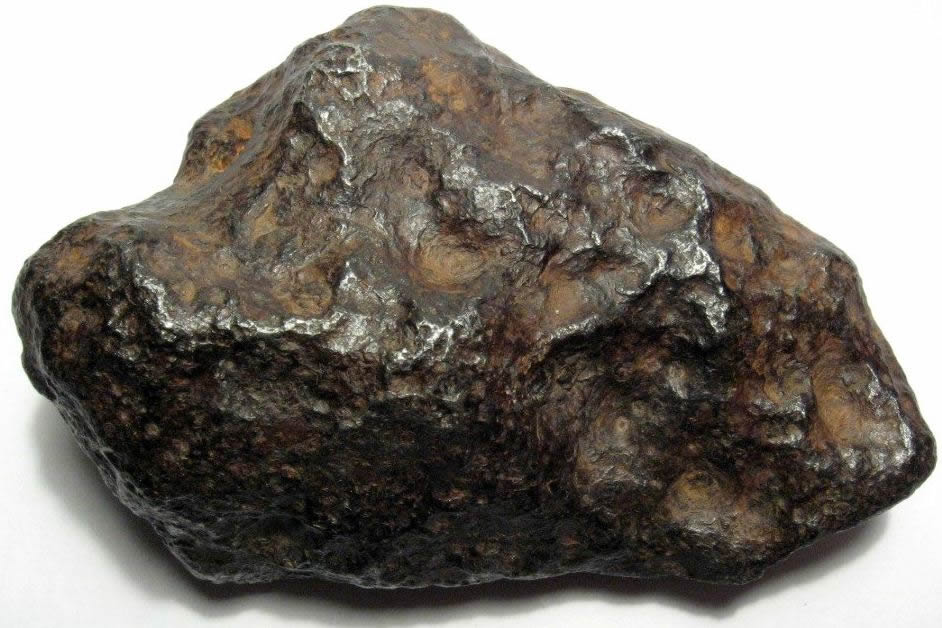
In the past it has happened that some meteorites are so big and so heavy that they violently hit the Earth forming huge craters several kilometers in diameter! In fact the Earth is hit by about 1000 tons of meteorites every day but most are so small, a fraction of a millimeter, that they go unnoticed or look like dust.
Sometimes some meteorites have done immense damage, shaving entire forests and burning all the trees by exploding in the air or touching the ground.
Recent falls include the 1794, when 200 meteorites fell from the sky over the city of Siena in Italy. In 1803, the village of Aigle in France (Orne) was bombed by 3000 meteorites!
In 1908, a meteorite fell in eastern Siberia at Tungunska and ravaged 200,000 ha of forest, fortunately virtually uninhabited. We felt its echo 600 km away and even in America the seismographs recorded the impact.
In 1969, in Allende, Mexico, large meteorites fell on a village and fragments were collected within a radius of 25 km!

Finally, every 2-3 years a meteorite weighing ten kilos falls on a house or a car as was the case in Peekskill near New York in the United States in 1992 and Japan and Australia in 1995 …
Meteorites and asteroids are very dangerous because if the biggest fall on a city, they can kill millions of people by exploding. If they fall into the sea they can create a tidal wave and flood all cities on nearby coasts and also make hundreds of thousands of deaths in minutes. It is for this reason that astronomers constantly monitor the sky and calculate the trajectories of all the asteroids that come a little too close to the Earth. We will come back to the frequency and the risk of impact.
If one of them collides with our planet in a month or a year, astronomers and the military will try to deflect it from its path. The risk of collision is very low but not zero and each year small asteroids approach the Earth at the distance of the Moon, sometimes even closer. In 1972, an asteroid was so close to the Earth that it entered the atmosphere but fortunately it returned to space. This object still weighed 1000 tons!
1,777 comments
http://certifiedcanadarx.com/# Certified Canada Rx
canadian pharmacy
pharmacy mexico: BajaRx Direct – mexico farmacia
rufus download Rufus is known as a lightweight, no-cost, open source utility designed to make bootable USB drives. It is used to prepare a USB flash drive that can install an operating system, run diagnostic tools, or start a recovery environment. The program requires no installation and can be run as soon as it is downloaded.
The primary purpose of Rufus is to create bootable USB media from ISO images with speed and stability. This allows users to install or run operating systems directly from a USB flash drive without the need for DVDs. The tool works with a wide range of operating systems and service utilities, which makes it useful for both regular users and system administrators.
Rufus works on computers with Microsoft Windows, starting from Windows 7. Both 32-bit and 64-bit versions are supported, and there is also a version available for ARM64 architecture.
The software lets users create bootable USB drives from many different ISO images. It can be used to prepare a USB drive for installing Windows 11, Windows 10, Windows 8.1, or Windows 7, as well as various Linux distributions. Rufus also works with DOS systems and other recovery or maintenance tools commonly used for troubleshooting computers.
One of the built-in features of Rufus is the ability to download official Windows ISO images directly from Microsoft servers. This allows users to obtain original installation images for Windows 8.1, Windows 10, and Windows 11 without searching for them on third-party websites.
In addition to creating bootable drives, Rufus can format USB devices. It supports several file systems including FAT32, NTFS, exFAT, UDF, and ReFS. This flexibility allows the USB drive to be prepared for different use cases and compatibility requirements.
Rufus supports both legacy BIOS systems and modern UEFI environments. Because of this, bootable drives created with Rufus can work on older computers as well as newer systems that use UEFI and Secure Boot.
Another feature included in Rufus is Windows To Go support. This option allows users to run a full Windows environment directly from a USB drive. It can be useful for testing systems, performing maintenance, or working on multiple computers without installing Windows on the internal drive.
Rufus also provides the option to bypass certain Windows 11 installation requirements. When creating an installation USB, the program can disable checks for TPM 2.0, Secure Boot, and minimum RAM requirements. This makes it possible to install Windows 11 on computers that would otherwise not meet the official hardware requirements.
One of the reasons Rufus has become popular is its speed and simplicity. The program is extremely small, about 1.9 MB in size, and runs as a portable application without installation. It is distributed under the GPL v3 open-source license, supports more than 70 languages, and contains no advertisements, bundled software, or tracking components.
Rufus works with a large number of ISO images. These include multiple versions of Windows, Windows Server editions, FreeDOS, and various system tools such as GParted, Hiren’s Boot CD, Parted Magic, and Clonezilla. Because of this wide compatibility, the program can be used not only for installing operating systems but also for disk management, data recovery, and system maintenance tasks.
To use Rufus, a computer running Windows 7 or later and a USB flash drive are required. The program does not need to be installed. Users simply download the executable file, run it, select the ISO image they want to use, and create a bootable USB drive. Due to its simplicity, speed, and reliability, Rufus remains one of the most widely used tools for creating bootable USB drives.
legit canadian online pharmacy: legitimate canadian mail order pharmacy – safe canadian pharmacies
pharmacy rx one cheapest pharmacy to fill prescriptions without insurance pharmacy online shopping usa
http://certifiednorthrx.com/# canadian pharmacy india
https://bajarxdirect.shop/# mexico online pharmacy
purple pharmacy: farmacia mexicana en linea – best mexican pharmacy
http://usmedssaver.com/# medical pharmacy